Barry On The Space – Zero‑Gravity Platform Madness
Barry is a tiny, fearless explorer who hops across floating platforms in a far‑flung 2D galaxy. Each jump takes him closer to a new planet, fresh secrets, and the next big challenge. If you love precise jumping, clever physics tricks, and a solo 1 Player adventure that feels both retro and fresh, this is the game that will keep your thumbs buzzing.
Barry On The Space – Core Mechanics
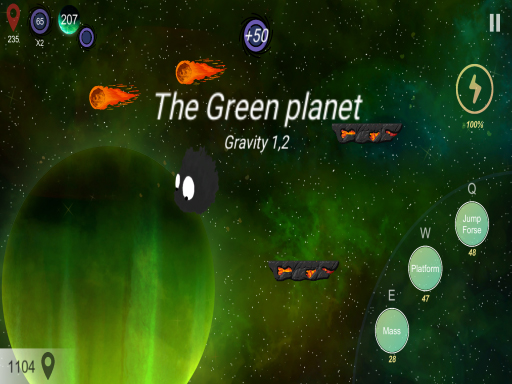
Controls are stripped down to the essentials, so you can focus on perfect timing and creative movement.
- Use the A and D keys or the left and right arrows to move your character in the game
- Press the Q key to perform a double jump
- Use the W key to create a platform under your character
- Press the E key to increase your mass and fall dow
Strategy – Mastering the Void
Every planet introduces a fresh layout of moving blocks, gravity flips, and hidden collectibles. Start each level by scouting the platform pattern. Spot the highest safe spot, then chain a double jump with a quick mass‑drop to smash through obstacles. When you’re low on platforms, press W to spawn a temporary stepping stone—use it to bridge gaps or to launch yourself higher. Keep an eye on the energy meter; it fuels both your jumps and the platform generator. Refill it by collecting glowing tokens scattered across the map. The more tokens you gather, the longer you can stay airborne, which is crucial on larger planets where the distance between safe zones can stretch for dozens of screen widths.
Advanced players learn to “mass‑slide” by holding E just before landing on a platform. The added weight lets Barry smash through weak walls and reveal secret chambers. Combine this with a well‑timed Q double jump to bounce off the newly opened area and reach hidden bonuses. Remember, the game rewards speed and efficiency—completing a planet quickly awards extra tokens, which can be spent on upgrades like higher jumps, faster platform creation, or reduced mass‑drop cooldown. Experiment with different upgrade combos to find the style that suits you best.
Ready to dominate the cosmos? Jump into Barry On The Space now, and prove that no planet is out of reach. The universe is waiting, and Juegos has crafted the perfect 2D platform playground for any boy‑ish heart that craves pure, unfiltered jumping action.
Use the A and D keys or the left and right arrows to move your character in the game Press the Q key to perform a double jump Use the W key to create a platform under your character Press the E key to increase your mass and fall dow