Passenger Airplane: Flight 3D – High‑Altitude Thrills
Take the cockpit and command a passenger jet across bustling skies. Real‑world routes, dynamic weather, and crisp 3D visuals put you in the pilot’s seat. Every take‑off feels like a power‑up, and each landing rewards precision. The game blends casual fun with the depth of a true flight simulator, making it a standout title among 2026 games. Whether you’re hunting the Best Games ranking or just craving a fast‑paced Adventure, this airplane experience delivers nonstop excitement on Android.
Mechanics
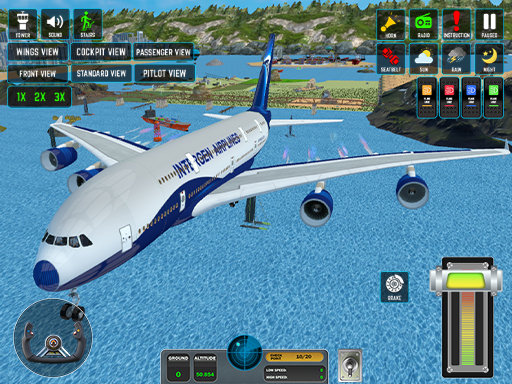
Control feels intuitive, yet offers room for mastery. The default layout mirrors real‑life cockpit gestures, while the settings let you swap to keyboard shortcuts for quick adjustments. Smooth response and tight feedback keep each maneuver feeling authentic. Below is the core control scheme you’ll rely on every flight.
- Default Joystick – Easy and smooth flying
- Arrow Keys – Selectable from Settings
- Slider Throttle – For race‑style speed control
Strategy
Master the flight path before you hit the runway. Start in Training Mode to lock down basic maneuvers, then graduate to World Map Mode for real routes. Prioritize smooth climbs; sudden spikes waste fuel (even if it’s unlimited, they waste time). Use the camera switches—cockpit, wing, external—to spot obstacles early. Weather changes aren’t just visual; storms reduce visibility and demand tighter throttle control. Aim for the highest passenger satisfaction rating; it unlocks bonus missions and upgrades. Keep an eye on leaderboards; climbing the Best Games list pushes you to refine timing and route efficiency. Remember, faster isn’t always better—precision beats speed when the runway is packed.
Ready to dominate the skies? Download Passenger Airplane: Flight 3D now and join the ranks of top pilots on Juegos. Feel the rush of 3D Games action, claim the title of Best, and watch your name rise among the most talked‑about 2026 games. The runway is waiting—fly it like a pro.
Default Joystick ndash Easy and smooth flying Arrow Keys ndash Selectable from Settings Slider Throttle ndash For race-style speed control