Click to play
x
Controls
Rawr












Click to play
This game is not available on mobile.

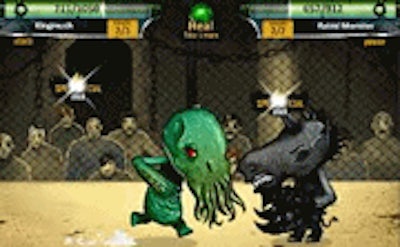
In Rawr, you command a snarling beast with a single purpose: crush foes, smash the arena, and rescue the friends trapped in Ghost Wood. The evil businessman has set the stage, but you hold the claws. Every clash feels raw, every victory echoes louder. This isn’t a slow‑poke RPG; it’s a rapid‑fire Flash showdown where timing beats tactics. Juegos delivers a pulse‑pounding battle that rewards skill over grind. If you love monster mayhem and instant‑action combat, you’ll feel the adrenaline surge from the first strike.
Control is stripped down to the essentials. One click, one roar, one decisive hit. The left mouse button launches your attack, letting you focus on positioning and enemy patterns. No clutter, just pure, unfiltered combat. The Flash engine ensures buttery‑smooth animation, while the RPG‑style progression lets you level up Rawr’s strength, speed, and ferocity. Each monster you face demands a different rhythm, keeping the battle fresh.
Winning isn’t just about mashing the button. Start by upgrading Rawr’s core stats after each arena run. Prioritize health if you’re facing tanky monsters, or boost attack speed for swarms of smaller foes. Learn each enemy’s tell‑tale movement; most monsters have a pause before they unleash a charge. Dodge at the right moment, then retaliate with a combo that chains into a critical hit. Use the arena’s environmental hazards—spikes, fire pits, falling crates—to turn the tide. Remember, the battle rhythm changes every level, so adapt your timing. The deeper you go, the more diverse the monster roster becomes, demanding fresh tactics and sharper reflexes.
Ready to tear through the arena and save the Ghost Wood crew? Jump into the fray now and let Rawr prove why it’s the fiercest Flash‑based monster brawler on the market. Play Rawr today and experience the chaos that only Juegos can deliver. The arena awaits—make every roar count.



































