Controls
Left click to make a vehicle stop.
Left click to make a vehicle stop.
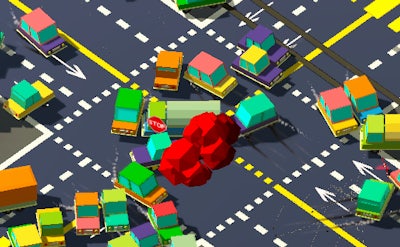


Ever wish you could turn a boring commute into a pulse‑pounding simulation? Slightly Annoying Traffic puts you in the driver’s seat of a hectic intersection where every car counts. Miss a stop, and the whole grid snarls. Master the art of traffic control and feel the rush of keeping the streets moving—no tickets, just pure, addictive fun. It’s the perfect blend of casual gameplay and strategic depth, crafted for players who love a good challenge without the endless grind.
Control is simple, but timing is everything. Click on any vehicle to freeze it in place, then watch the surrounding traffic flow around the obstacle you created. Each click reshapes the pattern, opening new routes for the stream of traffic behind it. The core loop is easy to pick up, hard to master—just the way a solid simulation should be.
Success hinges on foresight. Spot the high‑volume lanes and cut off the heaviest streams just enough to redirect traffic without causing a jam. Prioritize vehicles that are about to block a turn, and use quick clicks to create temporary “roadblocks” that force cars into alternative routes. As you clear more intersections, the game ramps up the speed and density, demanding sharper reflexes and smarter planning. Keep an eye on the mini‑map, anticipate bottlenecks, and you’ll find yourself glued to the screen, chasing that perfect flow.
Ready to prove you’ve got what it takes to tame the chaos? Jump into Slightly Annoying Traffic now and experience the most surprisingly satisfying traffic puzzle out there. Brought to you by Juegos, this title delivers bite‑size sessions that feel like a full‑blown simulation for your commute. Install, click, and dominate the intersection—your city’s streets will thank you.
Left click to make a vehicle stop.