Crossmath Challenge – Fast‑Paced Number Puzzle
Crossmath Challenge throws a classic crossword vibe into a fresh math arena. You line up tiles to form correct equations across and down, turning each grid into a living puzzle. The thrill comes from the ticking clock and the satisfaction of watching a blank board fill with logical solutions. If you love a quick brain workout that feels casual yet deep, this title forces you to think, calculate, and adapt in seconds. Mastery rewards precision, and every solved row sharpens your logic muscles.
Crossmath Challenge Mechanics
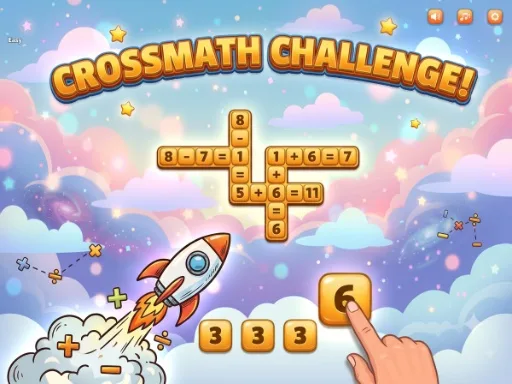
The control scheme keeps the focus on solving, not fumbling. Tap or click a tile from the tray at the bottom then tap an empty cell in the grid to place it. You can also drag a tile directly onto a cell. Tap Undo to remove your last placement. Shuffle to reorder your tray and Hint to auto-fill a cell limited use.
- Tap or click a tile from the tray at the bottom then tap an empty cell in the grid to place it.
- You can also drag a tile directly onto a cell.
- Tap Undo to remove your last placement.
- Shuffle to reorder your tray and Hint to auto-fill a cell limited use.
Crossmath Challenge Strategy
Start by scanning the grid for the easiest number slots. Spotting a single‑digit equation often unlocks a chain of placements. Keep an eye on the remaining tiles in your tray; they hint at which operations you’ll need later. When the clock ticks faster, prioritize rows that share cells – a correct tile there instantly validates two equations. Use the Shuffle button early to expose hidden combos, but save the Hint for moments when a single cell blocks your progress. As you climb the level ladder, the puzzles introduce extra symbols and tighter time limits, forcing you to balance speed with accuracy. Each victory expands your mental math toolbox, turning casual sessions into serious training for your brain.
Ready to put your logic to the test? Grab a tile, beat the timer, and watch the grid come alive. Jump into the challenge now and see why Juegos keeps the best number puzzles at your fingertips.
Tap or click a tile from the tray at the bottom then tap an empty cell in the grid to place it You can also drag a tile directly onto a cell Tap Undo to remove your last placement Shuffle to reorder your tray and Hint to auto-fill a cell limited use